FiveM Server Hosting
Rent a high-performance FiveM server with one-click txAdmin, ESX & QBCore installs, AMD Ryzen hardware, NVMe storage and 17Tb/s DDoS protection. Online in minutes.
DDoS Protection
AMD Ryzen 9
Online 24/7
Instant delivery
Great support

FiveM Server Hosting Plans & Pricing
FXServer I
From € 3,99 € 3,19 / mo
1x Ryzen 7950X CPU thread
1 GB DDR5 memory
10 GB NVMe SSD storage
No slot limit
17 Tbit DDoS protection
FXServer II
From € 6,99 € 5,59 / mo
2x Ryzen 7950X CPU threads
2 GB DDR5 memory
20 GB NVMe SSD storage
No slot limit
17 Tbit DDoS protection
FXServer III
From € 12,99 € 10,39 / mo
2x Ryzen 7950X CPU threads
4 GB DDR5 memory
50 GB NVMe SSD storage
No slot limit
17 Tbit DDoS protection
FXServer IV
From € 27,50 € 22,00 / mo
3x Ryzen 7950X CPU threads
8 GB DDR5 memory
100 GB NVMe SSD storage
No slot limit
17 Tbit DDoS protection
FXServer V
From € 39,99 € 31,99 / mo
4x Ryzen 7950X CPU threads
12 GB DDR5 memory
150 GB NVMe SSD storage
No slot limit
17 Tbit DDoS protection
FXServer VI
From € 54,99 € 43,99 / mo
6x Ryzen 7950X CPU threads
16 GB DDR5 memory
200 GB NVMe SSD storage
No slot limit
17 Tbit DDoS protection
FXServer VII
From € 64,99 € 51,99 / mo
6x Ryzen 7950X CPU threads
20 GB DDR5 memory
200 GB NVMe SSD storage
No slot limit
17 Tbit DDoS protection
FXServer VIII
From € 79,99 € 63,99 / mo
8x Ryzen 7950X CPU threads
25 GB DDR5 memory
300 GB NVMe SSD storage
No slot limit
17 Tbit DDoS protection
FXServer IX
From € 110,00 € 88,00 / mo
12x Ryzen 7950X CPU threads
32 GB DDR5 memory
300 GB NVMe SSD storage
No slot limit
17 Tbit DDoS protection
Add-ons for your FiveM server
Two services that run next to your FiveM server, managed from the same panel. Order them with your server or add them later; each has its own plan and can be cancelled on its own.
Voice server
A dedicated Zumble server for proximity voice, so heavy voice traffic never costs your game server performance. Works with pma-voice and SaltyChat on every framework.
- Own hardware, online 24/7
- pma-voice and SaltyChat
- Set up in minutes
From € 1,00 / mo
Order voice serverImage server
An upload address for the screenshots your scripts take: phone photos, mugshots, MDT evidence and anti-cheat captures. Your own https address and 30 GB of storage instead of a Discord webhook that throttles and deletes links.
- 30 GB NVMe storage on your own https address
- Works with screenshot-basic, phones and MDTs
- Key, usage and test upload in the panel
From € 7,50 / mo
Order image serverFiveM Server Locations Worldwide
Your community deserves low ping wherever it plays. Our FiveM servers run in datacenters across Europe (including Amsterdam, in our home country), North America, South America, Asia, Oceania and Africa, all connected through a network with 17Tb/s of DDoS mitigation capacity. Every location runs the same modern AMD Ryzen hardware with NVMe storage, so you never trade performance for proximity.
You pick the location at checkout, and our latency checker shows your real ping to each region before you order. Growing into a new region later? Our team can move your server between locations, so your first choice is never a lock-in.
Which FiveM Server Plan Do You Need?
FiveM performance depends less on raw player count and more on how heavy your resources are. As a rule of thumb:
Starting out · up to 32 players
A starter plan comfortably runs a fresh QBCore or ESX server with the standard resource pack while your community finds its feet. Because none of our plans impose slot limits, you configure the player cap yourself in your server settings.
Established roleplay · 32 to 64 players
Serious RP servers stack scripts, MLOs and custom vehicles, and that is what really consumes CPU and memory. Our mid-range plans give you the headroom to run a heavily scripted city without frame drops on busy evenings.
Large communities · 64+ players
With OneSync Infinity, FiveM supports hundreds of concurrent players. Our top plans pair high-clock Ryzen cores with generous memory for exactly this scenario, and upgrading between plans takes a few clicks and keeps all your data.
One-Click FiveM Framework Installation
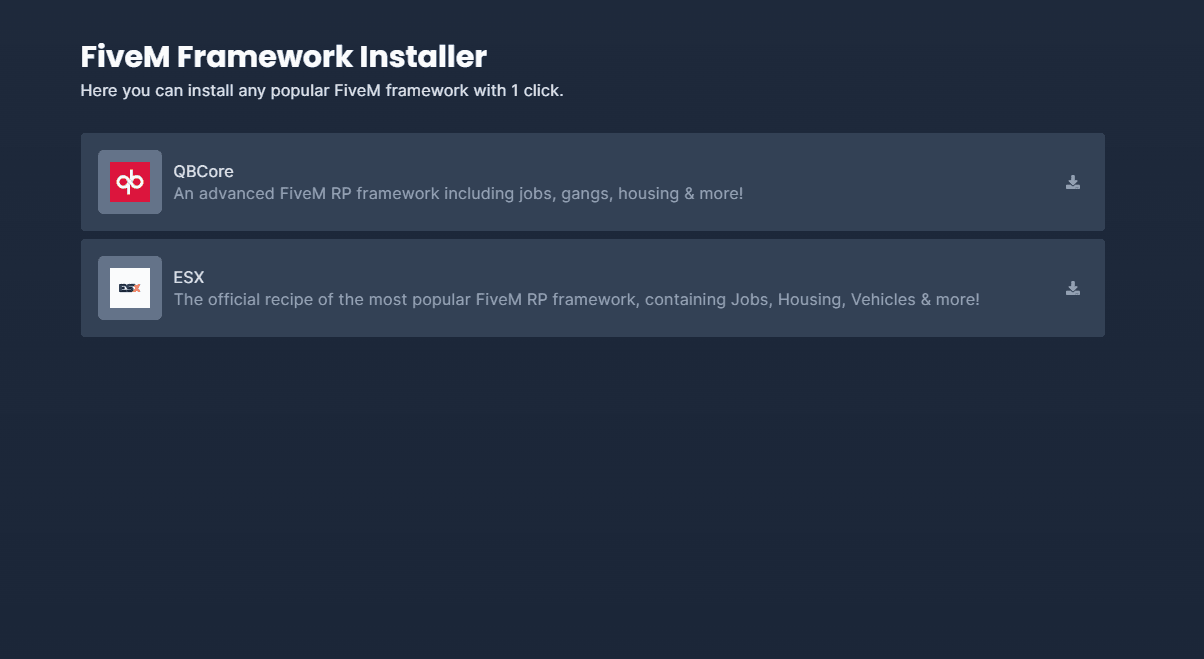
Simplify your server setup with our user-friendly control panel, enabling one-click installation of the most popular FiveM frameworks. Automatically download and configure all necessary files, set up your database, and configure txAdmin quickly and efficiently.
QBCore Framework
QBCore is a comprehensive roleplay framework designed for FiveM, equipped with essential tools and features to enhance in-game roleplaying, providing a robust platform for creating immersive gaming experiences.
ESX Legacy Framework
A staple in the FiveM community, ESX Legacy continues to be a popular choice for developers looking to build stable and feature-rich roleplay servers in FiveM.
Qbox Framework
Qbox is a modern, actively maintained fork of QBCore that focuses on performance, security and clean code. Our installer sets up Qbox Stable with one click, database and txAdmin included.
vMenu Freeroam
Running a freeroam community instead of structured roleplay? vMenu installs with one click as well, giving your players an in-game menu for vehicles, weapons, teleports and more.
Effortless FiveM Artifacts Updates
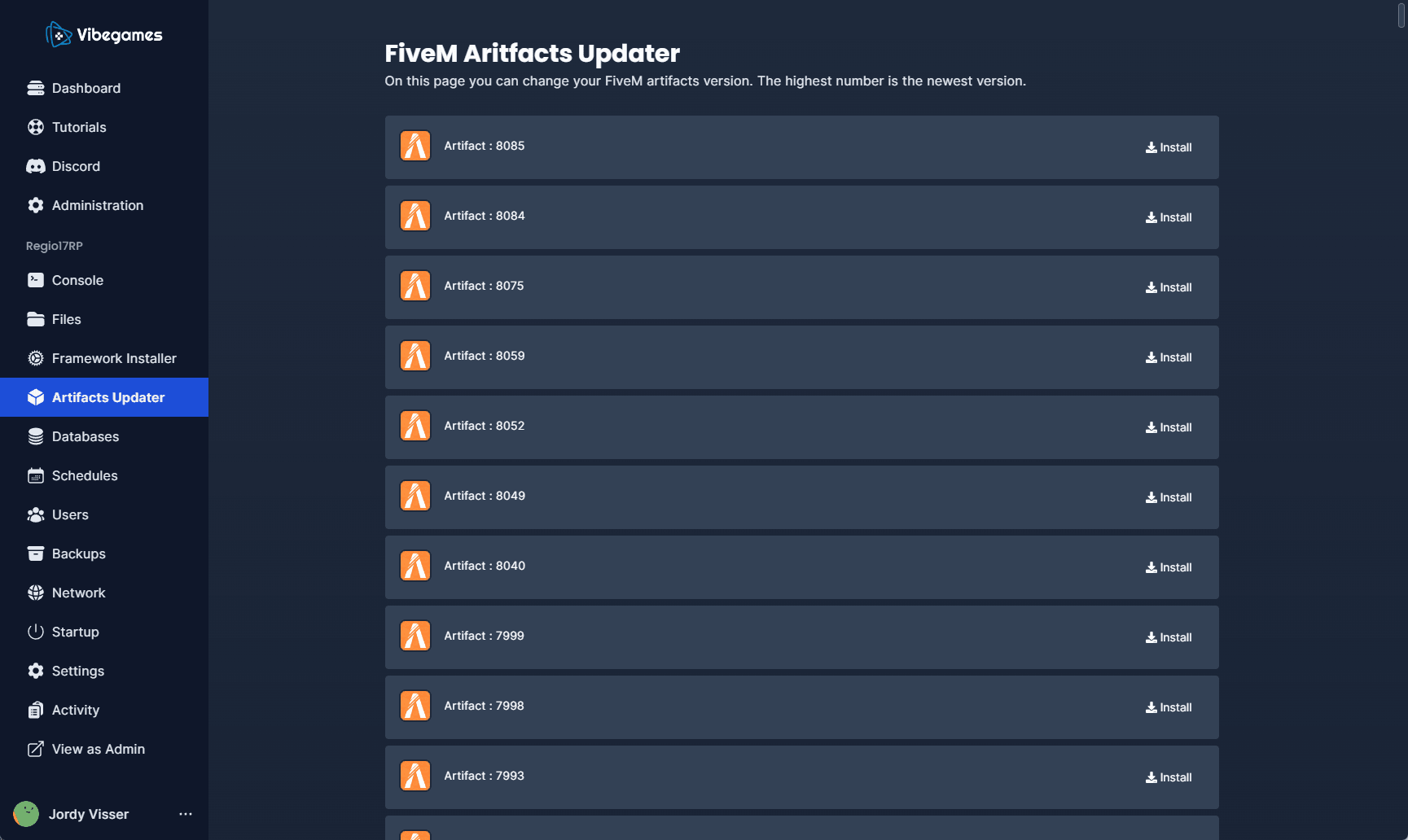
Keeping your FiveM server up-to-date is crucial for performance and security. Our FiveM Artifacts Updater simplifies this essential task. With just a single click, you can upgrade or change your server's version, ensuring you're always running the latest, most stable, and secure artifacts.
Navigate to the artifacts update page in the control panel, pick the version you want from the list of stable and experimental builds, and click Install. The system downloads and applies the update without interrupting your server's uptime or your players' experience.
Scripts, MLOs and Voice Resources
You get full control over your resources folder. Upload scripts through the control panel's file manager or connect over SFTP; anything written for FiveM runs on our servers, with no whitelist of allowed resources and no artificial restrictions. MySQL databases for your framework are included, ready for oxmysql or mysql-async.
Popular scripts
No whitelist, anything goesFrameworks and the standard scripts around them, straight from the file manager.ox_libox_inventoryox_targetqb-targetillenium-appearanceMods & content
Streams like on any FiveM serverInteriors, map edits, clothing and vehicles in the stream folder.MLOYMAPEUPVoice chat
Built into FXServerProximity voice works without any configuration on our side.pma-voiceSaltyChatMumbleDatabase & access
Included with every planA MySQL database for your framework and SFTP for large uploads.MySQLoxmysqlmysql-asyncSFTP
One server, every FiveM framework
Pick a plan by player count, not by framework: every plan runs QBCore, ESX, Qbox or vanilla, installed from the panel in one click and switchable later. This is what the most common setups look like on our servers.
QBCore
Installs with the base resources and a database already connected. A 32-slot city runs well on 4 GB; cities full of MLOs and custom cars are happier on 8 GB.
ESX and Qbox
Both come as one-click recipes with their default jobs, inventory and phone. Trying the other one later is a switch in the panel, not a reinstall.
Roleplay servers
A roleplay city needs uptime and voice above all. Proximity voice runs on the separate voice server, backups are automatic, and the DDoS filters are tuned for FiveM traffic, so a raid does not empty your city.
txAdmin included
Recipes, scheduled restarts, player management and the web console come with every server. You open txAdmin from the panel with one click; there is no port to forward.
Plans start at €3,99 per month without a slot limit or setup fee, so cheap FiveM server hosting does not mean a capped city. Rent a server for a month or a year, upgrade from the dashboard as the city grows, and move to a VPS whenever you want root access.
Switching From Another FiveM Host?
Moving an existing FiveM server is less scary than it sounds: your server is essentially your resources folder, your server.cfg and your database. Upload the files, import the database dump, point your license key at the new server, and your city is back online with everything intact.
Upload your resources
Import your database
Update your license key
Not comfortable doing that yourself? Open a ticket and our support team will guide you through the migration step by step. Most servers are moved within an evening.
FiveM guides
New to running a FiveM server, or moving from a home-hosted setup? These guides cover the decisions before and right after you order: what you need, what it costs, which framework and which artifacts. The help centre answers the day-to-day questions.
- How to make a FiveM serverFrom a fresh server to your first players: artifacts, txAdmin, database, framework and the first resources.
- FiveM artifactsWhat artifacts are, which build to run and how to update without breaking your server.
- Server requirementsHow much RAM, CPU and storage a FiveM server needs for 32, 64 or 128 players.
- What a FiveM server costsHosting, scripts, maps and the hidden costs, with realistic monthly totals.
- ESX vs QBCoreThe two big frameworks (and Qbox) compared, and which one fits your city.
- FiveM hosting vs VPSManaged game server or your own VPS: speed, control, DDoS protection and effort.
FiveM help centre
Step by step walkthroughs for setting up and running your server, written by the team that hosts it.
- Where to start with your new FiveM serverYou just got your FiveM server at VibeGAMES.
- How to Buy FiveM Hosting from VibeGames.comBuying a FiveM server at VibeGAMES takes a few minutes.
- FiveM license key (sv_licenseKey): where to find it and how to enter itEvery FiveM server needs a license key from Cfx.re.
- Connect your server to a databaseFrameworks like ESX and QBCore, and most scripts that save anything, need a MySQL database connection.
FiveM Server Hosting FAQ
What customers say
 4.5 out of 5 on Trustpilot, based on 660 reviews

Hassan Rashid
Jul 29, 2026

always love to work with them Goat customer since 2021

Joshua Blackman
Jul 15, 2026
I am never leaving this company , I have tried other VPS providers and this is on another level, never lags or crashes . Not just that, the customer service is efficient and really good. They are always there to help with your issues. Thank you VibeGames and Matt has helped me out countless times. Appreciate you all

Icee Gamer
Jun 20, 2026
Great help W
Players also host



Why choose VibeGAMES
DDoS protection
VibeSHIELD, our globally anycasted DDoS-protected network, now spans 46 scrubbing locations worldwide. Every point of presence filters traffic the instant it lands, stopping attacks as close to the source as possible, long before they ever reach your server.
All 46 locations combine into one unified DDoS-protected fabric, so the full capacity of the entire network backs every individual server. Layer that on top of custom game-aware filtering, tuned for the protocols our customers actually use, and it doesn't matter how big the attack is or how long it lasts. Your players stay connected.